Why HPUI?
This is rewrite of my PhD thesis introdiction.
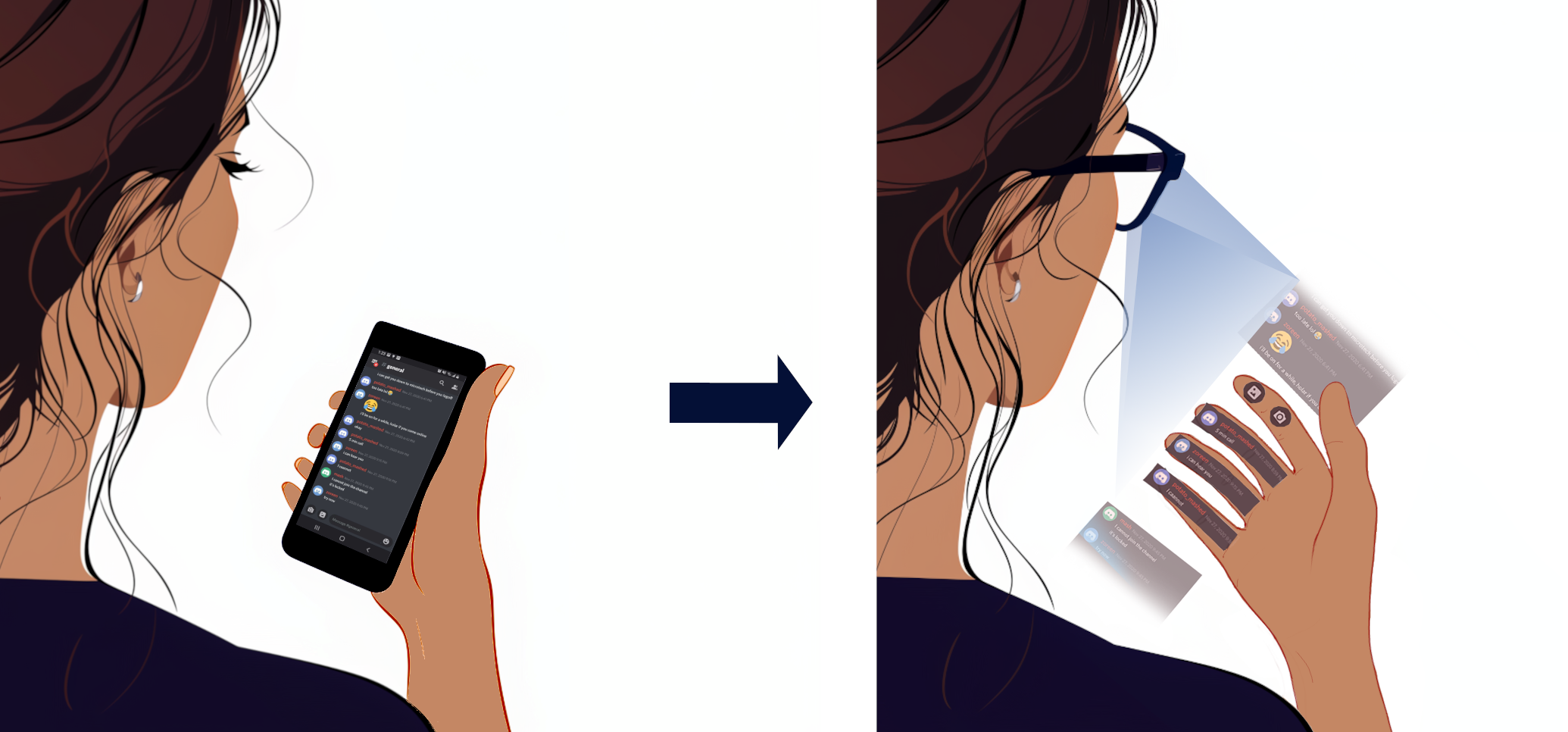
Smartphones, as the de facto mobile computing platform, boast impressive capabilities. However, their form factor can be a significant drawback. Every interaction requires reaching into a pocket. Wearable devices like smartwatches and smart rings aim to overcome some of these limitations. Although these wearables reduce the need to physically retrieve the smartphone, they are limited in their input and output capabilities.
We build on the notion that smart glasses, or Head-Mounted Displays (HMDs), could represent the next evolution in mobile computing. While HMDs face numerous challenges in realizing their full potential, this work focuses on the open research problem of user interactions on HMDs. Specifically, it explores replicating the smartphone experience on HMDs by projecting a virtual interface onto and around the hand, enabling users to interact with these virtual surfaces through taps and swipes just as they would on a smartphone. We refer to this approach as the Hand Proximate User Interface (HPUI).
But why would such an interface be useful? To answer this question, let us take a step back and situate HPUI within a larger vision for the future of mobile technology.
In an ideal world, the technology around us would blend in with the world around us - become invisible. To elaborate, Mark Weiser (Weiser 1999) uses written language as a metaphor. For example, when the reader wants to know what they are reading, they only have to glance at the top of the page and only for a moment. The information was always there at the top, but it did not require or draw any attention. Only when trying to get the information did it require the reader’s attention. Information of this nature is everywhere - readily available yet not constantly distracting us. The ability of written language to be ubiquitous, or to be able to blend into the background is because of literacy - users having learned to use it sufficiently well, that it requires minimal effort to use it.
For a computing platform to similarly blend into the background, there are several properties it would have to have. Mark Weiser describes (Weiser 1999) that it needs to adapt to different situations and operate at different scales - one can work on personal notes and also transition to collaborating with a group on a whiteboard. He further expands (Weiser and Brown 1996) that it needs to be able to stay in the periphery without distracting us, but seamlessly come into our focus and move back to the periphery when necessary - much like the title on the top of the page. This is under the assumption that the technologies involved would follow physical metaphors, like writing on a tablet the same way one would write on paper. However, the digital technologies we use can do far more than the physical metaphor it is built on - the tablet one could write on can do far more than just being a writing pad. This means the users have to learn and get used to these features that go beyond the physical metaphors. For this to happen, the interactions with these devices need to be easy to pick up and learn. Over time, users would build literacy in using these technologies (Cockburn et al. 2014). The phenomena of users knowing what can be clicked on a webpage or what can be tapped (Swearngin and Li 2019) on a touch screen are good examples of such literacy. Collectively, for technology to be ubiquitous, to blend into the background, it would need to (1) operate in different contexts and scales, (2) be able to seamlessly transition between one’s periphery and central focus while also being (3) intuitive and easy to use and learn.
An ideal HMD would embody these properties of ubiquitous technology much better than the current day’s smartphones. Unlike the smartphone, an HMD would be worn by the user; they would not have to reach for a bulky device tucked away when they need it. Additionally, one could easily get used to wearing it the same way they do with a watch or a pair of glasses. This form factor allows HMDs to see and hear the world the same way its users would. An increased awareness of the surroundings, combined with the ability to display information directly in the user’s field of vision, enables more effective decisions regarding when and where to present data. Consequently, a HMD can function optimally in a much wider range of contexts than a smartphone. With well-designed interfaces and interactions, an HMD can easily move content in and out of the user’s central focus. It also can enable its users to interact with digital content naturally and familiarly. However, HMDs have a long way to go before they can effectively replace smartphones.
As stated above, this thesis focuses on how one interacts with content on an HMD. Broadly, there are two types of interactive elements that one would encounter while using HMDs. First is 3D elements, like digital twins of physical objects. Given the affordances of HMDs, natural interactions can be used in such situations. The second type of interaction, which this thesis focuses on, is interaction with 2D content. From seeing information about a product at a glance before purchase to adjusting settings and reading or writing emails, there are numerous instances where interactions with 2D content would be necessary. Such interactions on HMD have been extensively explored with different modalities including mid-air interaction, gestures, gaze, and controllers. They all address different aspects of this interaction space. However, they tend to have associated limitations. The thesis proposes HPUIs as a solution for interacting with such content. Given the preference for single-handed interaction with mobile devices (Karlson, Bederson, and Contreras-Vidal 2008) (Karlson, Bederson, and Contreras-Vidal 2006), we are focusing on single-handed interactions.
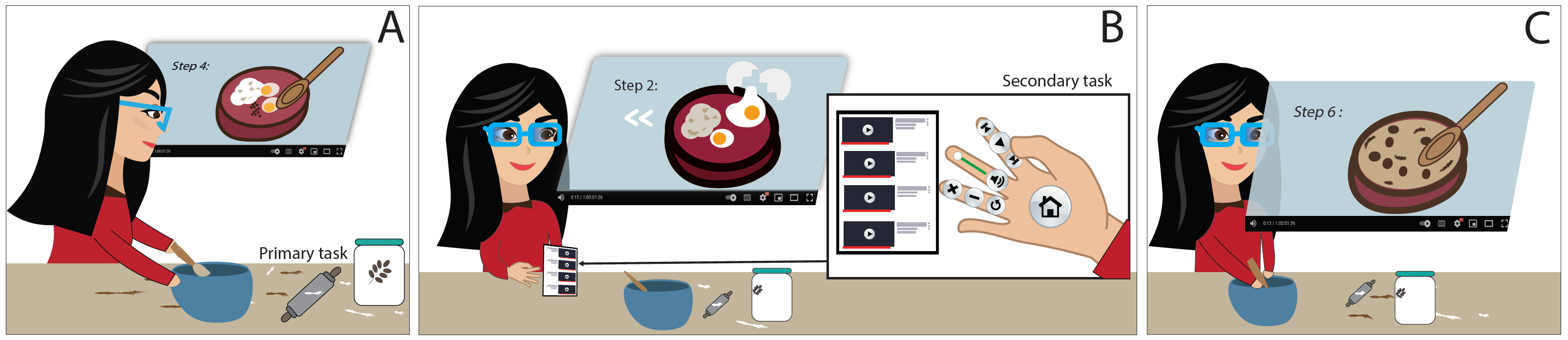
To elaborate on why HPUIs could be advantageous to interact with 2D content on HMD, we use Cloe’s example in the figure above - she is following a cooking tutorial video while wearing an HMD. Each interactive element is placed on the hand, with each element specifically anchored to a different finger or phalanx. This way, when she wants to interact with the video, like, to pause or to rewind, she can tap on the buttons on a given finger or phalanx, the same way she would tap on the smartphone while holding it in her hand. A gesture like this would be more socially comfortable to do than doing larger gestures or using voice while in public spaces (Efthymiou and Halvey 2016) (Alallah et al. 2018). It also would be more physically comfortable as holding ones hand up for mid-air interactions would be taxing (Li et al. 2023) (Hincapié-Ramos et al. 2014). Since the interactive elements are anchored to her hand, she doesn’t need to worry about adjusting their position for comfort, safety, or to prevent interference with her task - issues that require careful consideration in interaction techniques such as gaze or mid-air interactions (Lu, Pavanatto, and Bowman 2023) (Lindlbauer, Feit, and Hilliges 2019). When she wants to rewind she can quickly bring up her hand and select the appropriate button on an HPUI to do that. If Cloe is familiar with the layout of buttons on the hand, at least the common ones, like the rewind button, she can tap on the respective finger segment without taking her eyes off the task she is engaged with. Unlike proprioception in mid-air interaction (Hinckley, Pausch, and Proffitt 1997) (Lubos et al. 2016) (Xu et al. 2018) (Yan et al. 2018), we can much more accurately tell which part of a finger we are interacting with without looking at it. This allows users to focus more on the task at hand and is particularly advantageous in more attention-demanding situations. On the other hand, unlike voice or gesture interfaces, with an HPUI, Cloe would not have to wonder what interactions are possible or have to remember anything (Cafaro, Lyons, and Antle 2018) (Cockburn et al. 2014). Building on the smartphone metaphor, an HPUI can take advantage of users’ experience of interacting with the touch screen. Hence, if Cloe has to interact with an element she is not familiar with or does not know about, she can always look at her hand, and simply tap using the thumb of the same hand.
We can also frame the affordances of HPUI with the properties of ubiquitous technologies we had described earlier. HPUI would be an interface that would be easily available in any context. When one needs to interact with an HPUI, they bring up their hand, once interactions are done, they can easily put it away - it can seamlessly transition between being in the periphery and being the central focus. When a user is more familiar with the interface, this would require much less attention and effort. Further, a novice user would not have to remember where a button is on the interface - they can simply glance at their hand. Ultimately smartphones serve as a paradigm for intuitive, touch-based interactions, and HPUI seeks to replicate this familiarity on HMDs. Moreover, its promise extends to a wide array of other real-world situated contexts. In environments such as surgical theaters (Chopra et al. 2024) or manufacturing floors (Fang et al. 2023), HPUI can offer quick, accurate control while minimizing disruption. It is important to note that HPUI is not intended to replace other modalities like gaze, voice, or mid-air gestures; rather, it would augment them. Each interaction technique comes with its own strengths - gaze can efficiently signal intent (Lystbæk et al. 2024), while voice can convey complex commands (Kim et al. 2021), and mid-air gestures suit 3D content manipulation (Bergström et al. 2021) - but HPUI excels at providing a low-effort, socially comfortable method for interacting with 2D interfaces. By leveraging the users’ tactile perception and existing smartphone literacy, HPUI becomes a complementary tool in the wider ecosystem of interaction techniques on HMDs.
References:
- Weiser, M. (1999). The Computer for the 21 st Century. ACM SIGMOBILE Mobile Computing and Communications Review, 3(3), 3–11.
- Weiser, M., & Brown, J. S. (1996). Designing calm technology. PowerGrid Journal, 1(1), 75–85.
- Cockburn, A., Gutwin, C., Scarr, J., & Malacria, S. (2014). Supporting Novice To Expert Transitions in User Interfaces. ACM Computing Surveys, 47(2), 1–36.
- Swearngin, A., & Li, Y. (2019). Modeling Mobile Interface Tappability Using Crowdsourcing and Deep Learning. Proc. of the 2019 CHI Conference on Human Factors in Computing Systems
- Karlson, A. K., Bederson, B. B., & Contreras-Vidal, J. L. (2008). Understanding One-Handed Use of Mobile Devices. : IGI Global.
- Karlson, A. K., Bederson, B. B., & José Luis Contreras-Vidal (2006). Studies in One-Handed Mobile Design : Habit , Desire and Agility. 4th ERCIM Workshop User Interfaces All (UI4ALL)
- Efthymiou, C., & Halvey, M. (2016). Evaluating the Social Acceptability of Voice Based Smartwatch Search. : Springer International Publishing.
- Alallah, F., Neshati, A., Sakamoto, Y., Hasan, K., Lank, E., Bunt, A., & Irani, P. (2018). Performer vs. Observer: Whose Comfort Level Should We Consider when Examining the Social Acceptability of Input Modalities for Head-Worn Display? . Proc. of the 24th ACM Symposium on Virtual Reality Software and Technology - VRST ‘18
- Li, Y., Crowther, R., Smiley, J., Dwyer, T., Tag, B., Irani, P., & Ens, B. (2023). Revisiting Consumed Endurance: A NICE Way to Quantify Shoulder Fatigue in Virtual Reality. 29th ACM Symposium on Virtual Reality Software and Technology
- Hincapié-Ramos, Juan David, Guo, X., Moghadasian, P., & Irani, P. (2014). Consumed Endurance: A Metric to Quantify Arm Fatigue of Mid-Air Interactions. Proc. of the SIGCHI Conference on Human Factors in Computing Systems . New York, NY, USA: ACM.
- Lu, F., Pavanatto, L., & Bowman, D. A. (2023). In-the-Wild Experiences with an Interactive Glanceable AR System for Everyday Use. Proc. of the 2023 ACM Symposium on Spatial User Interaction
- Lindlbauer, D., Feit, A. M., & Hilliges, O. (2019). Context-Aware Online Adaptation of Mixed Reality Interfaces. Proc. of the 32nd Annual ACM Symposium on User Interface Software and Technology
- Hinckley, K., Pausch, R., & Proffitt, D. (1997). Attention and visual feedback. Proc. of the 1997 symposium on Interactive 3D graphics - SI3D ‘97
- Lubos, P., Bruder, G., Ariza, O., & Steinicke, F. (2016). Touching the Sphere: Leveraging Joint-Centered Kinespheres for Spatial User Interaction. Proc. of the 2016 Symposium on Spatial User Interaction
- Xu, X., Dancu, A., Maes, P., & Nanayakkara, S. (2018). Hand range interface: Information Always at Hand With A Body-centric Mid-air Input Surface. Proc. of the 20th International Conference on Human-Computer Interaction with Mobile Devices and Services - MobileHCI ‘18
- Yan, Y., Yu, C., Ma, X., Huang, S., Iqbal, H., & Shi, Y. (2018). Eyes-Free Target Acquisition in Interaction Space around the Body for Virtual Reality. Proc. of the 2018 CHI Conference on Human Factors in Computing Systems
- Cafaro, F., Lyons, L., & Antle, A. N. (2018). Framed Guessability: Improving the Discoverability of Gestures and Body Movements for Full-Body Interaction. Proc. of the 2018 CHI Conference on Human Factors in Computing Systems
- Chopra, H., Munjal, K., Arora, S., Bibi, S., & Biswas, P. (2024). Role of Augmented Reality in Surgery: Editorial. International Journal of Surgery.
- Fang, W., Chen, L., Zhang, T., Chen, C., Teng, Z., & Wang, L. (2023). Head-Mounted Display Augmented Reality in Manufacturing: a Systematic Review. Robotics and Computer-Integrated Manufacturing, 83, 102567.
- Mathias N. Lystbæk, Pfeuffer, K., Langlotz, T., Jens Emil Sloth Grønbæk, & Gellersen, H. (2024). Spatial Gaze Markers: Supporting Effective Task Switching in Augmented Reality. Proc. of the CHI Conference on Human Factors in Computing Systems
- Kim, Y., Lee, B., Srinivasan, A., & Choe, E. K. (2021). Data@Hand: Fostering Visual Exploration of Personal Data on Smartphones Leveraging Speech and Touch Interaction. Proc. of the 2021 CHI Conference on Human Factors in Computing Systems
- Joanna Bergström, Dalsgaard, T., Alexander, J., & Kasper Hornbæk (2021). How to Evaluate Object Selection and Manipulation in VR? Guidelines from 20 Years of Studies. Proc. of the 2021 CHI Conference on Human Factors in Computing Systems