Overview
This is a Python application that allows you to create/maintain/manage study configurations away from your implementations. experiment-server has several different interfaces (see below) to allow using it in a range of different scenarios. I've used it with Python, js and Unity projects. See the wiki for examples.
Documentation is available at https://shariff-faleel.com/experiment_server/
Content
- Overview
- Installation
- Usage
- Textual UI (TUI)
- Configuration of an experiment
- Verify config
- Loading experiment through server
- Loading experiment through API
- Generate expanded config files
- Function calls in config
Installation
Install it directly into an activated virtual environment:
or add it to your Poetry project:
Usage
Textual UI (TUI)
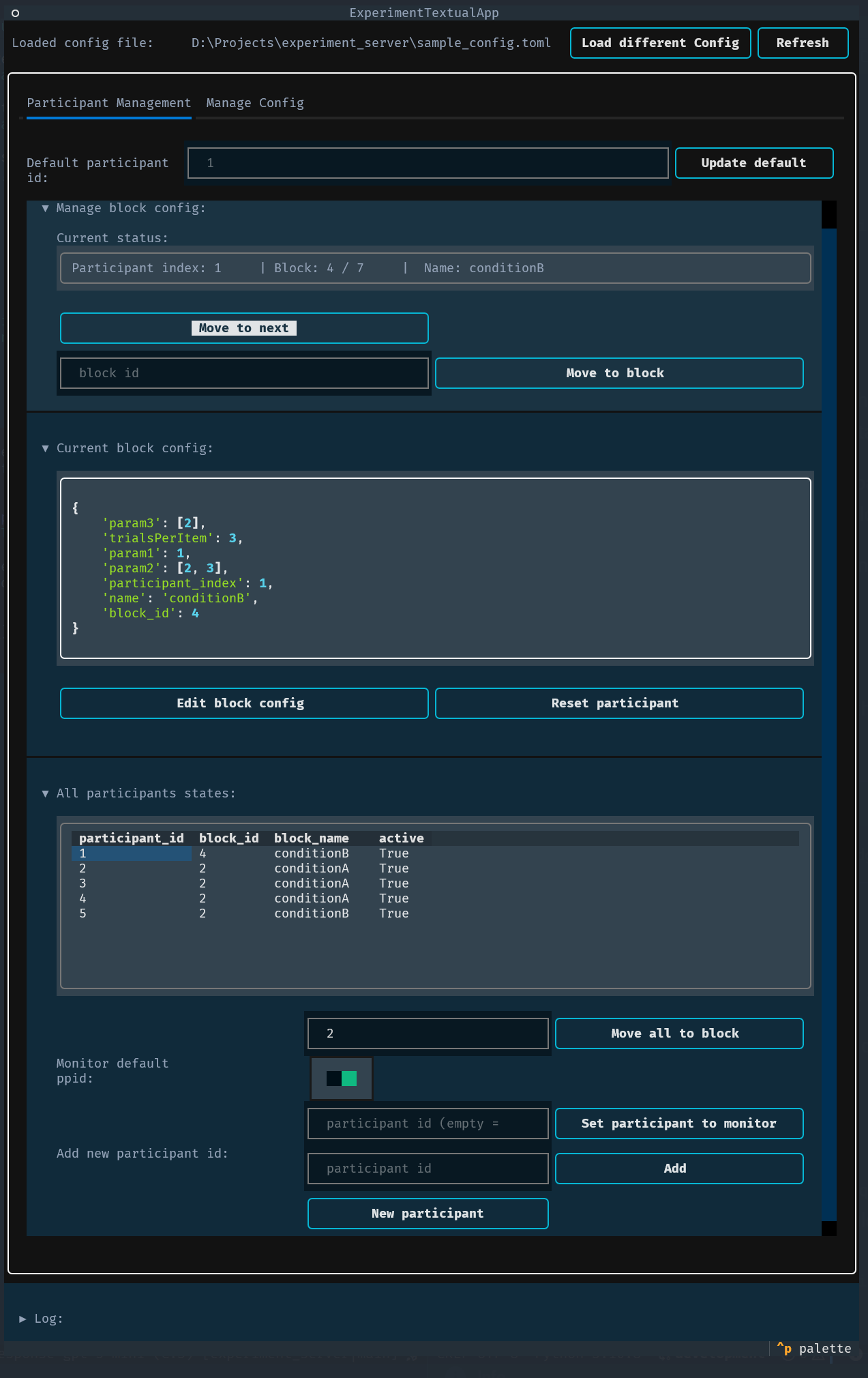
A terminal-based user interface is provided for interactive management and monitoring of an experiment. It is useful when you want a lightweight, keyboard-driven interface to load configs, inspect/generate per‑participant configs, edit files, and control participant flow without using the web UI.
Launch the TUI with:
# Start TUI (optionally provide a config file)
$ experiment-server ui
$ experiment-server ui -c sample_config.toml

# Common options
$ experiment-server ui -c sample_config.toml -i 1 -h 127.0.0.1 -p 5000
Options:
-
-c, --config-file : path to a .toml config to load on start (optional).
-
-i, --default-participant-index : default participant index to use when no explicit participant id is provided (default 1). (optional)
-
-h, --host : host/interface for the server (default 127.0.0.1). (optional)
-
-p, --port : port for the server (default 5000). (optional)
-
--editor-only : Launch the editor only. "-i", "-h", and "-p" will be ignored. When launching ui with "--editor-only", the config file ("-c") must be passed as well. (optional)
Behavior and features
-
Startup config validation - When launching the full TUI (without --editor-only), if a config file is provided it is validated at startup. If validation fails, the TUI will refuse to start the full UI/server and will exit with an error message suggesting use of verify-config-file or the editor-only mode to edit the file.
-
Can be started without a config file; load a config later from the built-in file browser (filters to directories and .toml files).
-
When a config is loaded the package starts the server in the same event loop, exposing the same REST API described elsewhere in this README.
-
Participant management:
-
View all participants and their status, block id and block name.
-
Create new participants (auto id or a specific id).
-
Move the default or a specific participant to the next block or to a specific block id.
-
Move all active participants to a block.
-
Reset a participant.
-
Choose a monitored participant to view its current config and status.
-
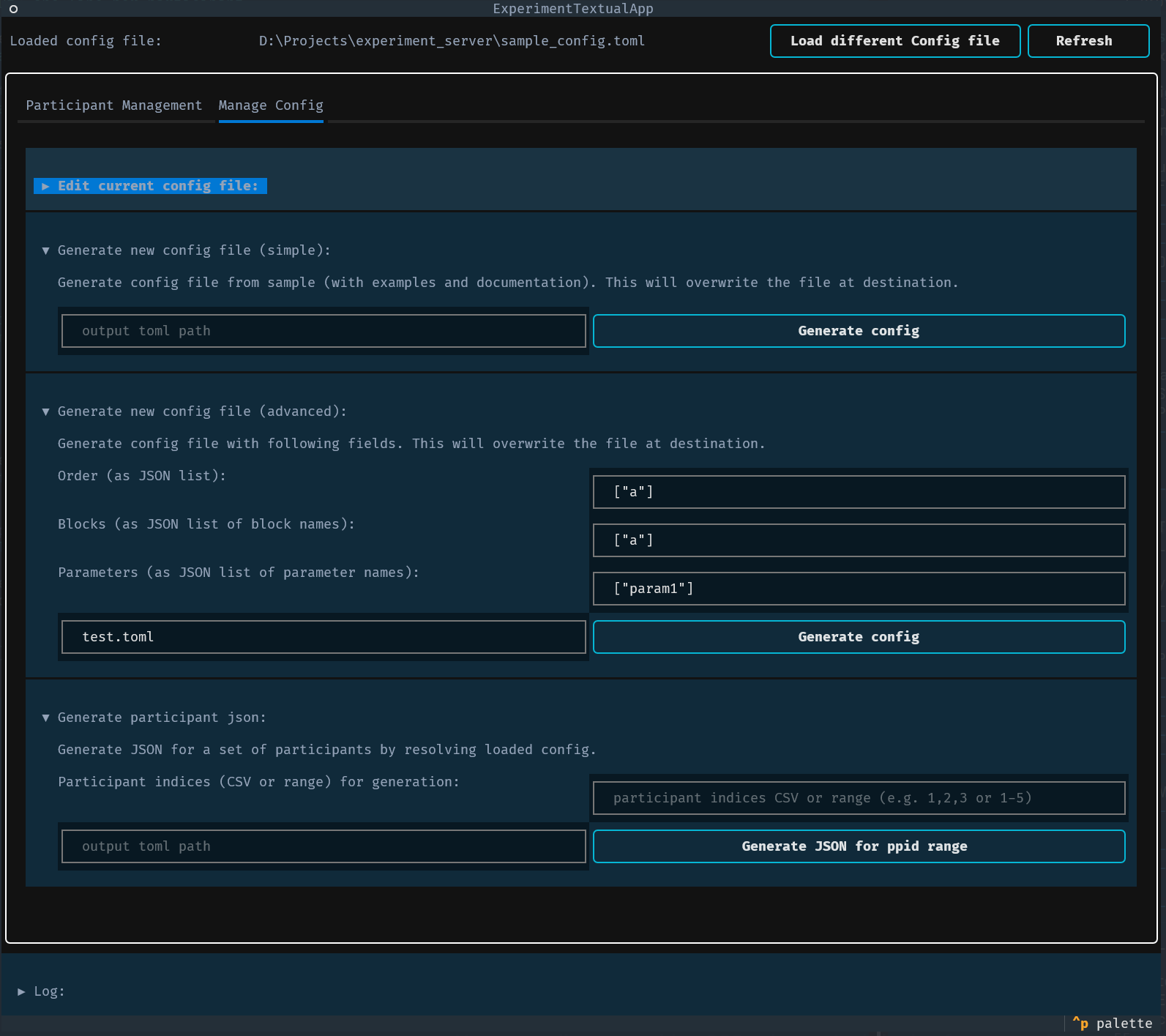
Config management:
-
View the currently loaded .toml contents in a code editor pane.
-
Edit the config in place and save; saving writes the file and the app will attempt to reload the config.
-
Generate new config files using simple or advanced helpers (write a minimal example or build from JSON-specified order/blocks/parameters).
-
Generate expanded JSON configs for a range of participant indices (write output to a directory).
-
Live logging pane shows application logs for actions and errors.
-
A simple edit UI is available to tweak the in-memory per-participant config (submit or cancel edits). The embedded editor provides:
-
An "Edit config" flow (Edit / Insert snippet / Save / Cancel).
-
"Insert snippet" to add common TOML fragments (blocks, strategy lines, init/final blocks, new variables).
-
Save-time validation: when you save from the TUI, the editor runs verification (same checks used by verify-config-file). If verification fails the UI shows the failure reason and asks you to confirm whether to write the file anyway.
-
editor-only TUI - A compact editor-only TUI is available via --editor-only. This launches a simple code editor for editing a config file without starting the HTTP server. Example:
# editor-only mode (requires a config file)
$ experiment-server ui --editor-only -c sample_config.toml
- Note: --editor-only requires -c/--config-file and will not start the server.
Notes
-
Editing and saving the config file from the TUI writes to the same config path the server is using; the TUI will attempt to reload the new configuration but will preserve participant state (see server behavior note in the Loading experiment through server section).
-
The TUI requires the textual/Rich environment provided by the package (normally installed with the package). Use
Ctrl+qto exit or the TUI's quit action.
This TUI is intended as a compact, interactive alternative to the web interface for quick testing, config edits, and participant control.
Configuration of an experiment
The configuration is defined in a toml file.
A config file can be generated as follows
See example .toml below for how the configuration can be defined.
# The `configuration` table contains settings of the study/experiment itself
[configuration]
# The `order` is an array of block names or an array of array of block
# names.  The `order` also can be a dictionary/table. If it is a
# dictionary/table, the keys should be participant indices starting
# from 1. The values should be a list of block names.  The keys are
# the participant indices - when experiment manager is queries with a
# given participant index, the dictionary/table will be used as a
# lookup table and the corresponding list of blocks will be used. When
# a participant index larger than the highest participant index is
# queries through experiment manager, the modulus of the index will be
# used to determine which list of conditions should be used.  In the
# following example order with a table/dictionary, participant index 4
# would get the blocks assigned to participant index 1:
#
# order = {1= ["conditionA", "conditionB", "conditionA", "conditionB"], 2= ["conditionB", "conditionA", "conditionB", "conditionA"], 3= ["conditionB", "conditionB", "conditionA", "conditionA"]}
#
# The same example as a toml table:
#
# [configuration.order]
# 1= ["conditionA", "conditionB", "conditionA", "conditionB"]
# 2= ["conditionB", "conditionA", "conditionB", "conditionA"]
# 3= ["conditionB", "conditionB", "conditionA", "conditionA"]

order = [["conditionA", "conditionB", "conditionA", "conditionB"]]

# The `groups_strategy` and `within_groups_strategy` are optional keys
# that allows you to define how the conditions specified in `order`
# will be managed.
# NOTE: This applies only when the `order` is a list.

# `groups_strategy` would dictate how the top level array of `order`
# will be handled. `within_groups_strategy` would dictate how the
# conditions in the nested arrays (if specified) would be
# managed. These keys can have one of the following values.
# - "latin_square": Apply latin square to balance the values.
# - "randomize": For each participant randomize the order of the
#                values in the array.
# - "as_is": Use the order of the values as specified.
# When not specified, the default value is "as_is" for both keys.
groups_strategy = "latin_square"
within_groups_strategy = "randomize"

# The following are optional keys. `init_blocks` is a list of blocks
# which will be appended to the start and `final_blocks` are a list of
# blocks that would be appended to the end. The respective strategies
# dictate the ordering withing the list of init or final blocks. For
# init and final blocks only the "randomize" and "as_is" are
# supported. By default, their values are "as_is".
init_blocks = ["initialBlock"]
final_blocks = ["finalBlockA", "finalBlockB"]
init_blocks_strategy = "as_is"
final_blocks_strategy = "randomize"

# The random seed to use for any randomization. Default seed is 0. The
# seed will be the value of random_seed + participant_index
random_seed = 0

# The subtable `variabels` are values that can be used anywhere when
# defining the blocks.  Any variable can be used by appending "$"
# before the variable name in the blocks. See below for an exmaple of
# how variables can be used
[configuration.variables]
TRIALS_PER_ITEM = 3

# Blocks are defined as an array of tables. Each block must contain
# `name` and the subtable `config`. Optionally, a block can also
# specify `extends`, whish is a `name` of another block. See below for
# more explanation on how `extends` works

# Block: Condition A
[[blocks]]
name = "conditionA"

# The `config` subtable can have any key-values. Note that `name` and
# `participant_index` will be added to the `config` when this file is
# being processed. Hence, those keys will be overwritten if used in
# this subtable.
[blocks.config]
trialsPerItem = "$TRIALS_PER_ITEM"
param1 = 1
# The value can also be a function call. A function call is
# represented as a table The following function call will be replaced
# with a call to
# [random.choices](https://docs.python.org/3/library/random.html#random.choices)
# See `# Function calls` in README for more information.
param2 = { function_name = "choices", args = { population = [1 , 2 , 3 ], k = 2}}
param3 = { function_name = "choices", args = [[1 , 2 , 3 ]], params = { unique = true } }

# Block: Condition B
[[blocks]]
name = "conditionB"
extends = "conditionA"

# Since "conditionB" is extending "conditionA", the keys in the
# `config` subtable of the block "conditionA" not defined in the
# `config` subtable of "conditionB" will be copied to the `config`
# subtable of "conditionB". In this example, `param1`, `param2` and
# `trialsPerItem` will be copied over here.
[blocks.config]
param3 = [2]

# Block: Initial block
[[blocks]]
name = "initialBlock"
[blocks.config]
param1 = 1

# Block: Final block A
[[blocks]]
name = "finalBlockA"
[blocks.config]
param1 = 1

# Block: Final block B
[[blocks]]
name = "finalBlockB"
[blocks.config]
param1 = 1
See toml spec for more information on the format of a toml file.
The above config file, after being processed, would result in the following list of blocks for participant number 1:
[
  {
    "name": "initialBlock",
    "config": {
      "param1": 1,
      "participant_index": 1,
      "name": "initialBlock",
      "block_id": 0
    }
  },
  {
    "name": "conditionB",
    "extends": "conditionA",
    "config": {
      "param3": [
        2
      ],
      "trialsPerItem": 3,
      "param1": 1,
      "param2": [
        1,
        3
      ],
      "participant_index": 1,
      "name": "conditionB",
      "block_id": 1
    }
  },
  {
    "name": "conditionA",
    "config": {
      "trialsPerItem": 3,
      "param1": 1,
      "param2": [
        2,
        2
      ],
      "param3": [
        1
      ],
      "participant_index": 1,
      "name": "conditionA",
      "block_id": 2
    }
  },
  {
    "name": "conditionA",
    "config": {
      "trialsPerItem": 3,
      "param1": 1,
      "param2": [
        2,
        3
      ],
      "param3": [
        2
      ],
      "participant_index": 1,
      "name": "conditionA",
      "block_id": 3
    }
  },
  {
    "name": "conditionB",
    "extends": "conditionA",
    "config": {
      "param3": [
        2
      ],
      "trialsPerItem": 3,
      "param1": 1,
      "param2": [
        2,
        3
      ],
      "participant_index": 1,
      "name": "conditionB",
      "block_id": 4
    }
  },
  {
    "name": "finalBlockA",
    "config": {
      "param1": 1,
      "participant_index": 1,
      "name": "finalBlockA",
      "block_id": 5
    }
  },
  {
    "name": "finalBlockB",
    "config": {
      "param1": 1,
      "participant_index": 1,
      "name": "finalBlockB",
      "block_id": 6
    }
  }
]
See construct_participant_condition and process_config_file for more information.
Verify config
A config file can be validated by running:
This will show how the expanded config looks like for the first 5 participants and will return a clear failure reason if the config is invalid.You can launch the editor-only TUI to edit the file in-place. This editor also has save time validation which can be used to verify the config before saving.
See also verify_config
Loading experiment through server
After installation, the server can used as:
See more options with --help
The server exposes the following REST API:
-
[GET]
/api/blocks-count//api/blocks-count/:participant-id- Return the number of blocks in the configuration loaded. For a given config, theblocks-countwill be the same for all participants. -
[GET]
/api/block-id//api/block-id/:participant-id- Returns the current block-id. Ifparticipant-idis provided, the blcok-id of the participant will be returned, if not the default participant's block-id will be returned. Note that the block-id is 0 indexed. i.e., the first block's block-id is 0. -
[GET]
/api/active//api/active/:participant-id- Returns the status forparticipant-id, ifparticipant-idis not provided, will return the status of the default participant. Will befalseif the participant was just initialized or the participant has gone through all blocks. To initialize the participant's status (or move to a given block), use themove-to-nextormove-to-blockendpoints. -
[GET]
/api/config/api/config/:participant-id- Return the config forparticipant-id, ifparticipant-idis not provided, will return the config for the default participant. -
[GET]
/api/summary-data//api/summary-data/:participant-id- Returns the summary of the configs forparticipant-id, ifparticipant-idis not provided, returns the summary of the configs for the default participant. Currently, the summary is a JSON with the following keys -
"participant_index"
-
"config_length"
-
[GET]
/api/all-configs//api/all-configs/:participant-id- Returns all the configs as a list for theparticipant-id, ifparticipant-idis not provided, returns the configs for the default participant.This is akin having all the results from calling theconfigendpoint for each block in one list. -
[GET]
/api/status-string//api/status-string/:participant-id- Returns status string forparticipant-id, ifparticipant-idis not provided, returns statu string the default participant. -
[POST]
/api/move-to-next//api/move-to-next/:participant-id- Moveparticipant-idto the next block, ifparticipant-idis not provided, move the default participant to the next block. If the participant was not initialized (activeis false), will make be marked as active (activewill be set to true). If the block the participant was in was the last block, they will be marked as not active (activewill be set to false). -
[POST]
/api/move-to-block/:block-id//api/move-to-block/:participant-id/:block-id- Moveparticipant-idto the block number indicated byblock-id, ifparticipant-idis not provided, move the default participant to the block number indicated byblock-id. If the participant was not initialized (activeis false), will make be marked as active (activewill be set to true). Will fail if theblock-idis below 0 or above the length of the config. -
[POST]
/api/move-all-to-block/:block-id- Move all active participants (activereturns true) to the block number indicated byblock-id. -
[POST]
/api/shutdown- Shuts-down the server. -
[PUT]
/api/new-participant- Adds a new participant and returns the new participant-id. The new participant-id will be the largest current participant-id +1. -
[PUT]
/api/add-participant/:participant-id- Add a new participant withparticipant-id. If there is already a participant with theparticipant-id, this will fail.
For a Python application, experiment_server.Client can be used to access configs from the server. Also, the server can be launched programmatically using experiment_server.server_process which returns a Process object.
NOTE: If the config file served is changed, the new config will be loaded, but the state of the participants will be maintained. i.e., the added participants and the block id they are at will not change. To move the block ids for all active participants, you would have to call the move-all-to-block endpoint.
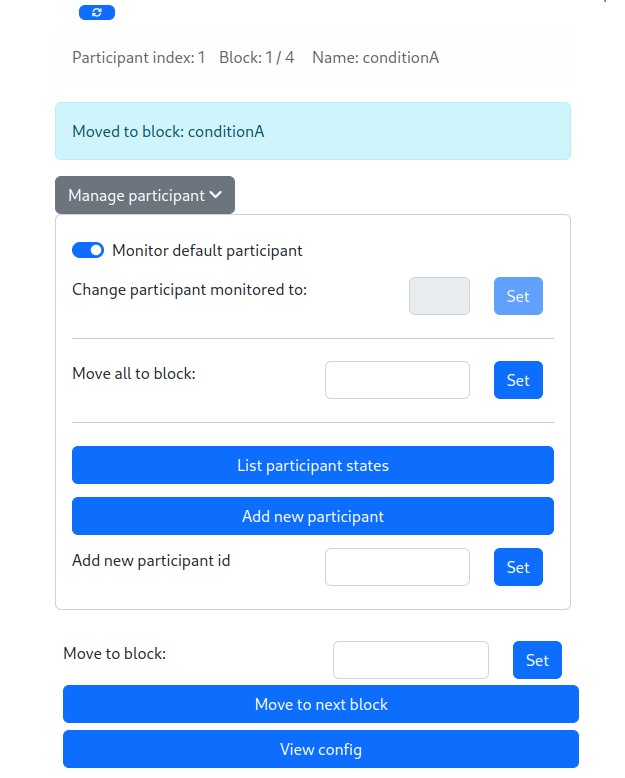
The server also provides a simple web interface, which can be accessed at / or /index. This interface allows to manage and monitor the flow of the experiment:
Loading experiment through API
A configuration can be loaded and managed by importing experiment_server.Experiment.
Generate expanded configs
A config file (i.e. .toml file), can be expanded to JSON with the following command
The above will generate the expanded configs for participant indices 1 to 5 as JSON output on stdout. This result can be written out to individual JSON files by setting the --out-dir/-d to a directory. See more options with --help
See also _generate_config_json
Function calls in config
A function call in the config is represented by a table, with the following keys
-
function_name: This should be one of the names in the supported functions list below. -
args: The arguments to be passed to the function represented byfunction_name. This can be a list or a table/dict. They should unpack with*or**respectively when called with the corresponding function. -
(optional)
params: function-specific configurations to apply with the function calls. -
(optional)
id: A unique identifier to group function calls.
A table that has keys other than the above keys would not be treated as a function call. Any function calls in different places of the config with the same id would be treated as a single group. Tables without an id are grouped based on their key-value pairs. Groups are used to identify how some parameters affect the results (e.g., unique for choices). Function calls can also be in configurations.variabels. Note that all function calls are made after the extends are resolved and variables from configurations.variabels are replaced.
Supported functions
choices: Calls random.choices.paramscan be a table/dictionary which can have the keyunique. The value ofuniquemust betrueorfalse. By defaultuniqueisfalse. If it'strue, within a group of function calls, no value from the population passed torandom.choicesis repeated for a given participant.
Example function calls
param = { foo = "test", bar = { function_name = "choices", args = { population = ["w", "x", "y", "z"], k = 1 } } }
For more on the experiemnt-server and how it can be used see the wiki